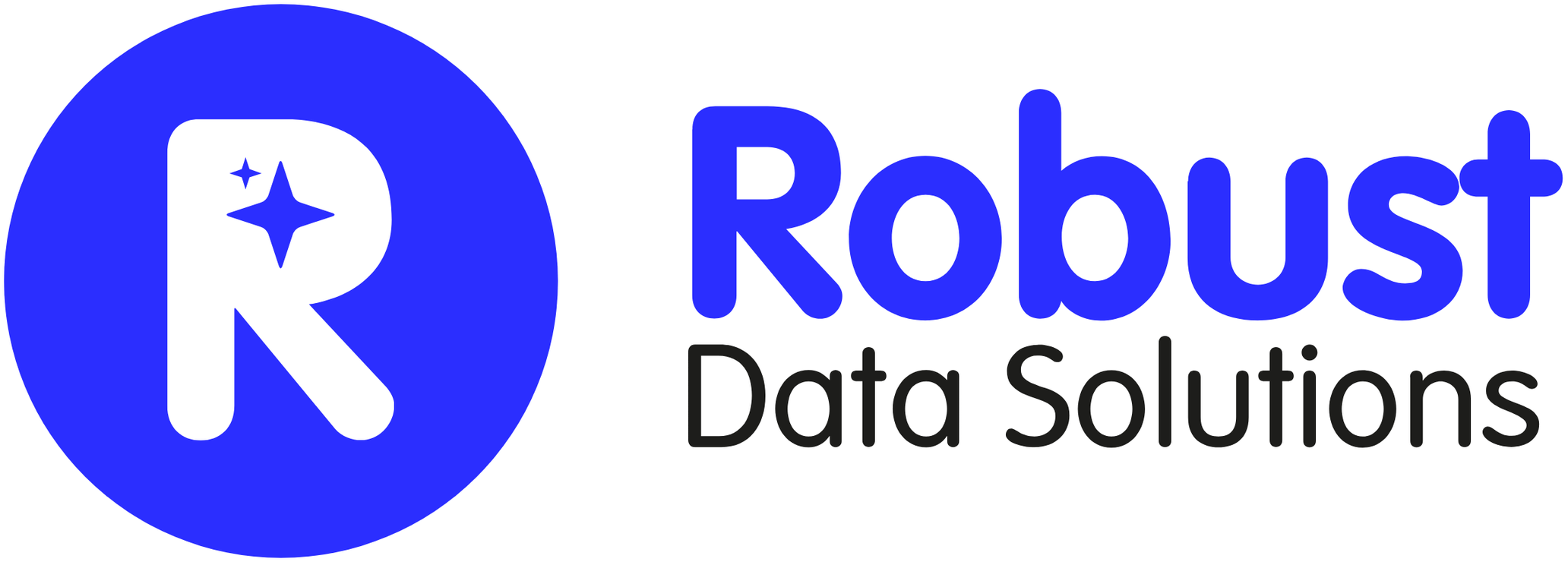
How it works: your programs connected to a single AI
Robust Data Solutions puts a smart connector on each of your company’s programs and brings them together in a single AI. You talk or type; the AI looks things up and prepares the work, and a person approves it before it happens.
That’s how you run your whole company from one screen, by text or by voice, with guardrails: permissions per person and a log of every operation. And your team gains up to 30% more capacity without hiring anyone.

One smart connector per program, one screen
Your company, connected
We connect artificial intelligence to the programs you already use: ERP, CRM, email, WhatsApp, calendar, documents and accounting. Each person has a single point of entry: one conversation from which they look things up and work with everything.
We don’t install generic connectors: we custom-build them, one at a time. That’s why they’re faster, show visual dashboards right inside the conversation, and do what a standard connector can’t. We’ve built more than 20 so far, with over 3,000 functions in all.
Each person signs in with their own identity and only sees and does what their permissions allow. Every operation is logged: who, what and when.
Ask it this, and this happens:
“Which customers have owed us money for more than 60 days? Send them a reminder.”
It cross-references the accounts with each customer’s record, prepares a personalized reminder for each one and shows it to you before sending it.
“Prepare the quote and send it to the person in charge.”
It takes the customer’s details and the prices from your programs, drafts the quote and leaves it ready for you to review and send.
“What do I have tomorrow and what should I prepare?”
It reads your calendar, gathers each client’s latest emails and documents, and gives you a summary of every meeting.
“Reply to this WhatsApp with the order status.”
It finds the order in your ERP, drafts the reply and waits for you to confirm it.
“Transcribe this morning’s meeting, send the executive summary to the team and the next steps to the client, update the CRM, and tell Juan on WhatsApp that we’ll meet on Friday to go over it.”
One sentence, five tasks at once across four programs: it transcribes the meeting, prepares the summary for your team and the next steps for the client, updates the CRM and drafts the WhatsApp message. It shows you everything before sending anything.
Talk to your company by voice, from your phone
Talk to your company. And it talks back.
On your phone, with the Claude app, you have a real voice conversation with your company: you ask, it answers out loud, asks you to clarify when it isn’t sure, and does what you ask in your programs. It isn’t dictating a message: it’s talking to an assistant that knows your company and works with your data.
The 360 effect
For the first time, email, accounting, customers and documents are together.
All together, for the first time
The system sees at once what no single person can see at once: a customer’s email, what they owe you and the contract you signed.
Answers in seconds
Questions that today mean opening several programs and cross-referencing data by hand are answered in seconds, in a conversation.
Every connector adds value
Each new program we connect multiplies the value of the previous ones: more cross-referenced data, better answers.
AI agents with a person in charge
Robust Autopilots
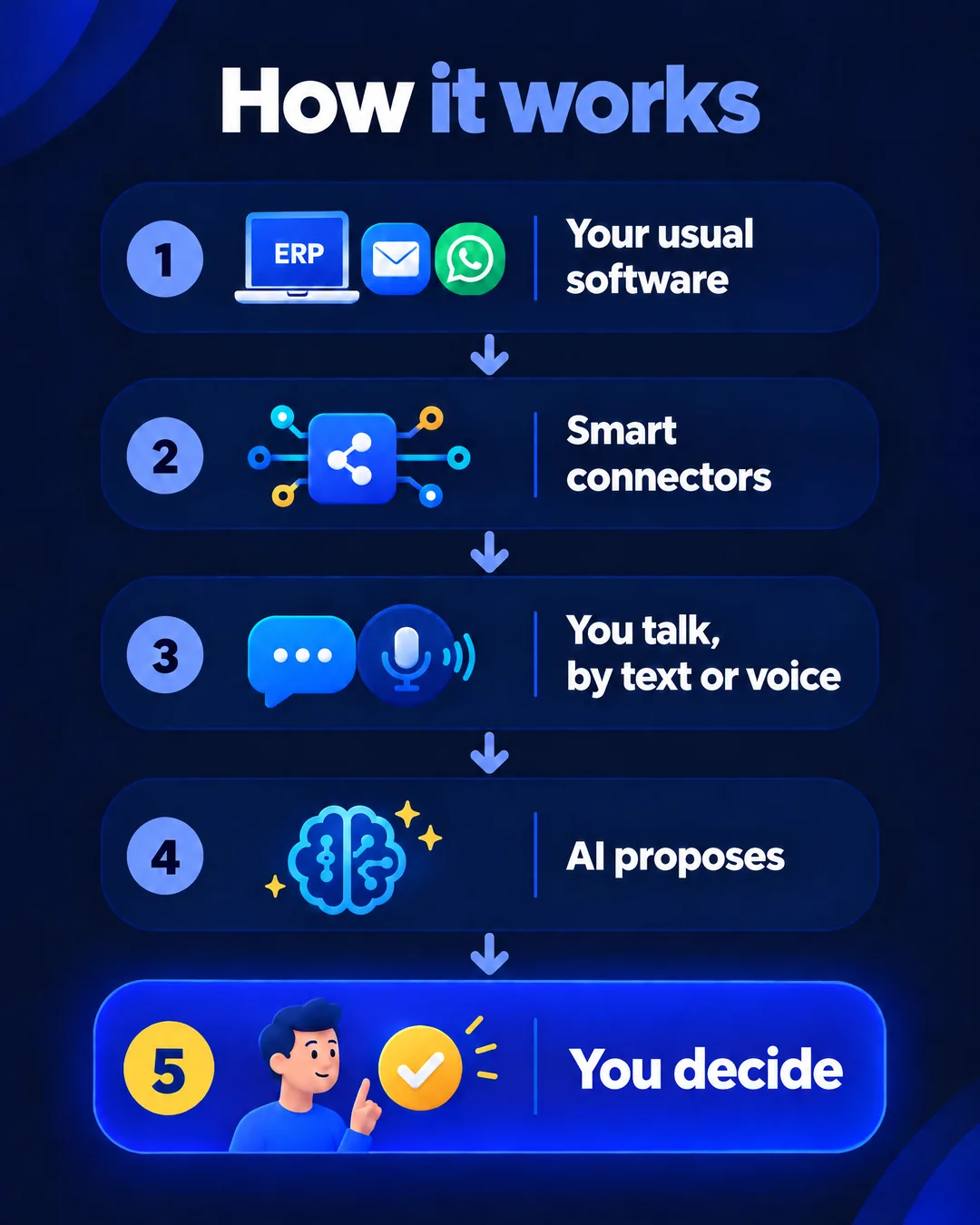
Autopilots that handle the repetitive work on their own, always with a person in charge. An email comes in: they understand it, prepare the reply or the document and process it; you see it, stop it or correct it. Reminders, follow-ups, due-date notices, certificates generated from an email request, or the whole income tax campaign circuit at a tax and accounting advisory firm.
1. An email arrives
A request, an order or a document: they receive it and understand it.
2. They prepare it
They prepare the reply or the document and leave it ready to be processed.
3. You’re in charge
You see what they’ve done and you stop it or correct it. Always with a person in charge.
Guardrails: permissions per person and a log of every operation
What you can’t do in your program, the AI can’t do either
Everyone signs in with their own identity and only sees and does what their permissions allow. Every operation is logged: who, what and when. And before changing anything, the AI shows you what it’s going to do and waits for your confirmation.
Human in the Loop: AI proposes, a person decides
Our AI works with your data and never decides on its own: it proposes, and a person always makes the final decision. No sensitive action (money, contracts, customer data) is carried out without confirmation. Before anything changes, you see what it’s going to do and approve it.
Your company calls the shots
What you already have, and what you’re missing
When a screen is needed, we build it
Almost everything is done by talking. When a job needs its own screen (a dashboard to see how the day is going, an app for the team out in the field or a portal for your customers), we build it to measure, designed mobile-first and connected to the same data. Our founder has more than 40 years of experience in business technology, management software included: the program adapts to your company, not the other way around.
We add, we don’t replace
Your ERP is still your ERP and your email is still your email. If you ever stopped working with us, you’d keep invoicing and reading your email exactly as you do today. And you have a documented exit plan to get your data back in a usable format.
Connect or switch programs
Connecting your programs to AI vs. switching tools
There are two ways to bring AI into your company: connect the programs you already use to an AI, or replace them with a new tool that has AI built in. Here’s how they compare:
| Connect your programs to an AI | Switch to a new tool |
|---|---|
| Your programs and subscriptions | |
| They stay as they are. | They’re replaced by the new tool. |
| Data migration | |
| Not needed: the AI works with your data where it already is. | Your data has to be moved to the new program. |
| What your team has to learn | |
| Almost nothing: you work by talking, as you would with a person. | A whole new program. |
| Time to get started | |
| From the first connected program, adding one at a time. | Once the migration is finished. |
| What the AI sees | |
| All your programs at once: email, customers, accounting and documents. | Only what’s inside that tool. |
| If you ever stop using the AI | |
| You keep working the same way with your programs. | You’d have to migrate your data again to another program. |
The law comes first: GDPR and the EU AI Act
In artificial intelligence, the law comes first
In many AI projects, data protection and security are left until the end. Or not dealt with at all. Here they come first.
Every project goes through a regulatory compliance review (data protection and the EU AI Act) with our partner Forrellat Consultors, a Data Protection Officer registered with the Spanish Data Protection Agency (AEPD). More about compliance.
It all starts with a diagnosis. Before connecting anything, we study how your company works. See how the diagnosis works.
We sell what we use
This is how our own company works
Everything connected
Robust runs on its own system: CRM, email, WhatsApp, calendar, documents and accounting, all connected to the same artificial intelligence, with more than 400 operations available.
One connector per person
Each person has a single connector with their own permissions, and every operation is recorded in a tamper-proof log. Before changing any data, the system shows what it’s going to do and asks for confirmation.
Talking instead of filling in forms
Since February we have made more than 2,600 changes in our CRM by talking to the AI, instead of filling in forms.
Real Human in the Loop
In a mailing to our partners, the person rejected four of the six corrections the AI suggested before sending it.
Frequently Asked Questions
How AI connects to your programs
How do you connect ChatGPT or Claude to my ERP?
With a smart connector: a piece we build for your ERP that lets Claude or ChatGPT read from it and write to it with each person’s permissions. Robust Data Solutions puts one on each program—ERP, CRM, email, WhatsApp, documents—and brings them together in a single AI. Before writing anything, the AI shows you what it’s going to do and waits for your confirmation.
The full picture: how to connect ChatGPT or Claude to your ERP
Which programs can be connected?
All of your company’s programs, today’s and tomorrow’s, whoever makes them: ERP, CRM, email (including good old-fashioned email, not just Google or Microsoft), calendar, WhatsApp, documents or accounting. We start with the main ones, the ones your team uses most hours a day. If one is very old—say, a database custom-built years ago—we bring it up to date first: we rescue its data and move it to a modern program, custom-built if needed, that can then be connected securely. We assess this in the diagnosis, before we start.
Does it work by voice from my phone?
Yes. On your phone, with the Claude app, you have a real voice conversation: you ask, it answers out loud, asks for clarification if it’s unsure and does what you ask in your programs. You can also type, on your phone or your computer.
What if the AI gets something wrong?
That’s why a person always decides. The AI proposes and shows you what it’s going to do before changing anything; if something isn’t right, you correct it or stop it. No sensitive action—money, contracts, customer data—runs without confirmation, and every operation is logged: who, what and when.
What if we stop working together one day?
You keep working exactly as you do today: your ERP is still your ERP and your email is still your email. We add, we don’t replace. And you have a documented exit plan to get your data back in a format you can use.
Last reviewed: October 13, 2026
Shall we talk about your company?
Tell us how you work and which programs you use. In half an hour we’ll show it to you working.